Showing posts with label Software. Show all posts

Sunday, 23 October 2011

SoftMaker Office 2012 beta for Windows... Try It..

SoftMaker Office 2012 for Windows will be released in a few weeks. Until then, you can already try out the beta version. Simply download and install it. You will love the improvements!


Compatible with Microsoft Office 2010, 2007, 2003, and more.

For an office suite to be useful, it must be compatible with Microsoft Word, Excel, and PowerPoint – both with the older file formats DOC, XLS, and PPT and the new formats DOCX, XLSX, and PPTX that have been introduced with Microsoft Office 2007 and 2010.
SoftMaker Office 2012 passes this test with flying colors: it reads and writes not only the old Microsoft formats seamlessly, but does the same precise job with DOCX, XLSX, and PPTX files, too.
You won't find any other office suite that renders Microsoft Office files as faithfully as SoftMaker Office 2012.

Fast, powerful, reliable.

SoftMaker Office is versatile: It lets you work on everyday office files quickly, but also helps you create long documents and easily design a flyer or brochure. Thanks to its vast repertoire of functions, it handles all office tasks, yet keeps the ease of use SoftMaker Office is renowned for. Even complex tasks get completed quickly.

Helps with foreign-language documents, too.

SoftMaker Office lets you create and edit documents in all the world's languages, even Hebrew and Arabic which are written from right to left. On-the-fly spellchecking is available in 20 languages, automatic hyphenation in more than 30.
An exclusive addition to SoftMaker Office Professional 2012 are its four Berlitz dictionaries that allow you to look up translations from/to English/German, English/French, English/Spanish, and English/Italian.

E-mails, contacts, calendars: SoftMaker eM Client

A brand new feature in SoftMaker Office Professional 2012 is SoftMaker eM Client. It does what Microsoft Outlook does, but better: It manages your e-mail messages, contacts, tasks, and appointments – both locally and using standard Internet technologies.
Kiss good-bye to Microsoft Office: SoftMaker Office 2012 lets you text, calculate, and present better... and SoftMaker eM Client is the perfect replacement for Microsoft Outlook!


FOR DOWNLOAD VISIT THIS PAGE


Monday, 19 September 2011

Windows 8 Developer Preview 32 Bit

What do I need to say, this is the Windows 8 developer preview 32 bit, this does not contain any of the developer tools.
Currently I have not had a chance to install/try this yet so I will not be able to offer any technical help.
Includes a disk image file (.iso) to install the Windows Developer Preview and Metro style apps on a 32-bit PC.

 Windows 8 Developer Preview 32 Bit
Windows 8 Developer Preview 32 Bit
Windows OS | Year: 2011 | Developer Preview | Platform: 32 bit | 2.83 GB


System RequirementsWindows Developer Preview works great on the same hardware that powers Windows Vista and Windows 7:

1 gigahertz (GHz) or faster 32-bit (x86) or 64-bit (x64) processor
1 gigabyte (GB) RAM (32-bit) or 2 GB RAM (64-bit)
16 GB available hard disk space (32-bit) or 20 GB (64-bit)
DirectX 9 graphics device with WDDM 1.0 or higher driver
Taking advantage of touch input requires a screen that supports multi-touch

Notes about installing the Windows Developer PreviewYou can't uninstall the Windows Developer Preview. To reinstall your previous operating system, you must have restore or installation media.
Install on: Windows Developer Preview with developer tools Windows Developer Preview (32-bit or 64-bit)
Windows 7 and Windows Vista Clean install only You can keep accounts, files, and settings
Windows XP Clean install only You can only keep accounts and files
A clean install is supported on all builds. You will only receive the full set of installation options when setup is launched in Windows.

How to install the Windows Developer Preview from an ISO imageThe Windows Developer Preview is delivered as an .iso image that must be converted into installation media stored on a DVD or a USB flash drive. On Windows 7, the easiest way to convert this file is to use Windows Disc Image Burner. On Windows XP and Windows Vista, a third-party program is required to convert an .iso file into installable media—and DVD burning software often includes this capability.

Download Links:
http://www.filesonic.com/folder/11675881

Upgrade to a FileSonic Premium account and download at incredible speed! And Make Money Sharing your files

Sunday, 18 September 2011

How to restore Windows Default Settings in just a click

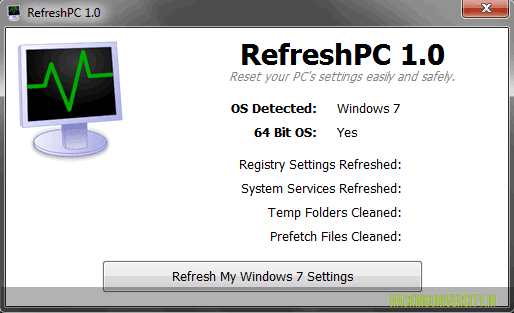
If you are facing some slow random errors in your PC and you think that it needs to be checked or formatted than you do not need to format else you can refresh it or restore it to its default settings.
RefreshPC is a small utility that allows Free restore the default settings of Windows. This can fix many
problems on your computer. RefreshPC is easy to use and secure. When you run it you can create a restore point system, which can be useful for undoing changes made ​​by RefreshPC later if necessary.
How to Restore Windows Default Settings
After you have installed this software on your machine all you need do is click Refresh My Windows Settings. He will restore the default settings for essential services and system specific keys from the Windows registry and ultimately will make the cleaning of temporary folders.
Once the cleaning and restoration process is completed, it will prompt you to restart Windows. Click OK to restart the system and see if Windows will start to behave normally.

DOWNLOAD HERE

                    Compatible with Windows XP, Windows Vista and Windows 7 (32 and 64 biit)    

Remove Unwanted “Create New” Shortcuts in Right Click Menu


It happens sometimes that during installation, some applications add entries to the new menu that are not used by the you at all. It would not make sense to keep them in the menu especially if the menu contains a lot of additional entries already.

This makes folder navigation slow making you wait every time you want to make a new folder or access the right click options.

How to Remove Items in Right Click “NEW” Context Menu

ShellMenuNew is a small utility that displays the list of all menu items in the ‘New’ submenu of Windows Explorer. It allows you to easily disable unwanted menu items, so this ‘New’ submenu will display only the items that you need.
shellmenunewRemoveItemsinRightClickNEWContextMenu Remove Unwanted Create New Shortcuts in Right Click Menu
After running it, the main window of ShellMenuNew displays the list of all ‘New’ menu items found in your Registry.
Download ShellMenuNew : Link
You can select one or more menu items and then disableenable them. If you are a power user, you can also select a single menu item, use the ‘Open In RegEdit’ option, and then manually edit or delete the menu item in RegEdit.

Saturday, 17 September 2011

Ninite: Easily Install Multiple Free Windows Apps in One Go


ninite thumb Ninite: Easily Install Multiple Free Windows Apps in One Go
Ninite is a service that lets users install popular Windows applications automatically. It allows
users to make a selection from a list of applications and bundles the selection into a single installer package. The service offers the most current versions of nearly every popular mainstream freewares as well as most used program including Firefox, Skype, OpenOffice, iTunes, Picasa, Steam, and Revo Uninstaller.
Once you’ve made your picks, click Get Installer to download a small executable file. When you’re ready, run that file and sit back while Ninite goes to work.
Website: Link
Ninite can be used to install many programs at once and no need to install each and every application one by one. Its most useful if you format your PC every now and then (like meicon wink Ninite: Easily Install Multiple Free Windows Apps in One Go ) or buy new PC or Laptop.
Let me know in comments your favorite freewares and if you’ve any easy method to install them.

Thursday, 15 September 2011

Find & Delete Duplicate, Even Similar Looking Images, Pictures

Ever thought that you’ve similar images and wanted to delete them without going through each and every image again and again? Similar Picture Find is a freeware product for searching duplicate and similar pictures in large collections of picture files (photos, wallpapers, textures, etc.).


It supports all well-known picture file formats including bmp (dib), gif, jpg (jpeg, jpe, jfif), png, tif (tiff) and others. If you want to find out is there any duplicate pictures on your hard drive the Similar Picture Find is what you really need.

simple picture find1 Find & Delete Duplicate, Even Similar Looking Images, Pictures

Features of Similar Picture Find:

  • Robust and configurable parallel comparison algorithm.
  • Supports well-known picture storage formats.
  • Easy to use.
  • Freeware. No registration is required.

                         DOWNLOAD THEME PACK HERE