Showing posts with label Download. Show all posts

Friday, 28 October 2011

Download BattleField 3

Battlefield 3 (c) Electronic Arts Inc.
10/2011 :..... RELEASE.DATE .. PROTECTION .......: EA/Crap
2 :.......... DISC(S) .. GAME.TYPE ........: Shooter

 
 
Battlefield 3 leaps ahead of its time with the power of Frostbite 2, the
next instalment of DICE's cutting-edge game engine. This state-of-the-art
technology is the foundation on which Battlefield 3 is built, delivering
enhanced visual quality, a grand sense of scale, massive destruction,
dynamic audio and incredibly lifelike character animations. As bullets whiz
by, walls crumble, and explosions throw you to the ground, the battlefield
feels more alive and interactive than ever before. In Battlefield 3,
players step into the role of the elite U.S. Marines where they will
experience heart-pounding missions across diverse locations including Paris,
Tehran and New York.

Frostbite 2 Battlefield 3 introduces Frostbite 2, the incredible
technology that takes animation, destruction, lighting, scale and audio to
new heights. Built upon this powerful game engine, Battlefield 3 immerses
players physically and emotionally to the world around them like never
before.

Feel the Battle Feel the impact of bullets and explosions, drag your
fallen comrades into safety, and mount your weapon on almost any part of
the terrain. Battlefield 3's cutting edge animation, spectacular visuals
and real as hell battle gameplay attack your senses and make you feel the
visceral warrior's experience like no other FPS.

Unparalleled Vehicle Warfare The best online vehicle warfare experience
gets even better with a fitting sonic boom as fighter jets headline an
impressive lineup of land, air and sea vehicles. Other returning fan
favourite features include 64 players for PC and prone.

Urban Combat Take the fight to iconic and unexpected places in the USA,
Middle East, and Europe including claustrophobic streets, metropolitan
downtowns, and open, vehicle-friendly landscapes as you fight your way
through the war of tomorrow.
 
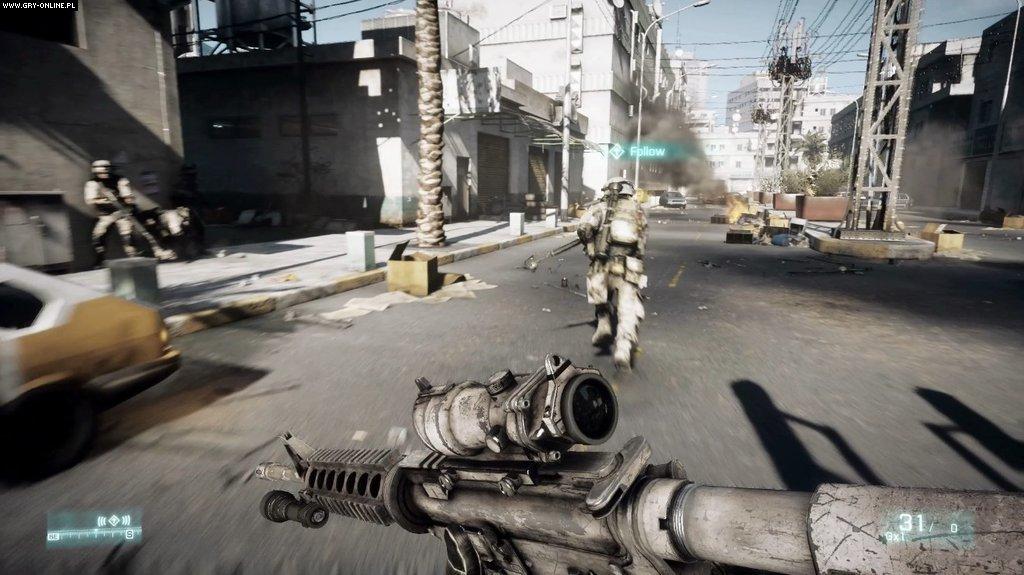
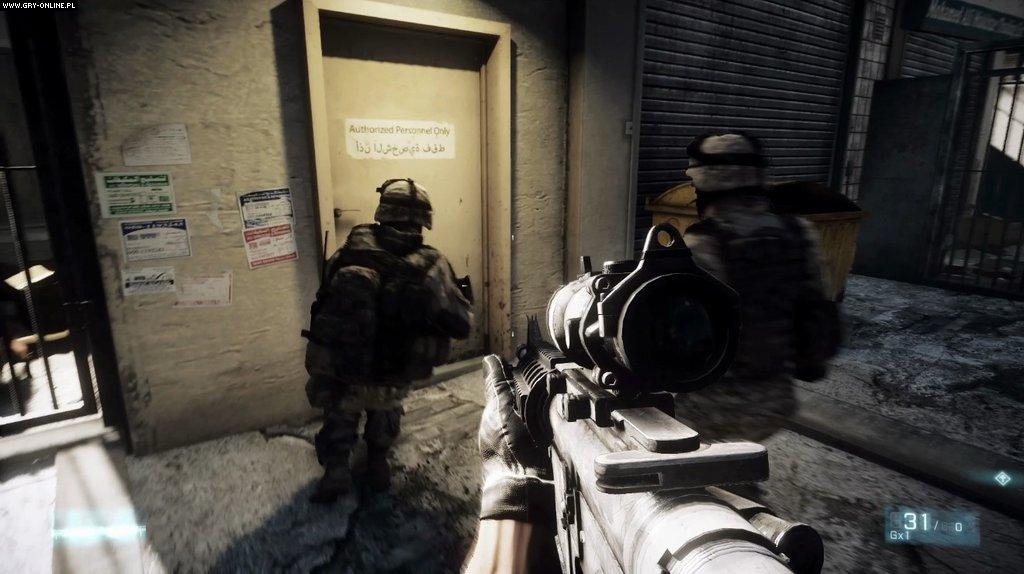
Game Screen Shots >>> 
 
 
HOW TO INSTALL >>>

1. Unrar.
2. Burn or mount the image.
3. Install the game. Redistributables as needed in \__Installer
dir afterwards.
4. Copy over the cracked content from the Crack dir on DVD2 to your
installation dir.
5. Play the game. 
 
SYSTEM REQUIRMENT >>> 
  
Minimum system requirements

OS: Windows Vista (Service Pack 2) 32-Bit
Processor: 2 GHz Dual Core (Core 2 Duo 2.4 GHZ or Althon X2 2.7 GHz)
Memory: 2 GB
Hard Drive: 20 GB
Graphics Card (AMD): DirectX 10.1 compatible with 512 MB RAM (ATI RADEON 3000, 4000, 5000 OR 6000 series, with ATI RADEON 3870 or higher performance)
Graphics Card (NVIDIA): DirectX 10.0 compatible with 512 MB RAM (NVIDIA GEFORCE 8, 9, 200, 300, 400 OR 500 series with NVIDIA GEFORCE 8800 GT or higher performance)
Sound card : DirectX compatible
Keyboard and Mouse

Recommended system requirements

OS: Windows 7 64-Bit
Processor: Quad-Core CPU
Memory: 4 GB
Hard Drive: 20 GB
Graphics Card: DirectX 11 compatible with 1024 MB RAM (NVIDIA GEFORCE GTX 560 or ATI RADEON 6950) Sound Card: DirectX compatible
Keyboard and Mouse
DVD ROM Drive


                DOWNLOAD TORRENT

Sunday, 23 October 2011

Neo Downloader 2.6

If you are frustrated in searching of how to download audio, video, photos with single drag-n-drop. Here I found one solution, let’s try it. Just drag a link from your browser to the program's Drop Basket and this award-winning tool will scan the website and download all media files automatically.


Features:
  • Downloads your choice of pictures, audio, video and any other files.
  • Easy to use even for beginners.
  • No pop-ups and banners.
  • Supports ZIP/RAR archives.
  • Up to 20 simultaneous connections.
  • Downloads from TGP sites and password protected sites.
  • Supports downloading URL ranges.
  • Advanced filtering - allows to download only those what you want.
  • Built-in image viewer with slideshow capabilities and audio/video player.
  • Ability to set any downloaded picture as a Windows wallpaper.
Download NeoDownloader 2.6 (3.3 MB)


Wednesday, 19 October 2011

100 HD Wallpapers Download

Download some of the best HD Wallpapers for your desktop and tweak out your desktop and if you like these please share them with all your friends.


100 HD Wallpapers Download100 HD Wallpapers Download100 HD Wallpapers Download

DOWNLOAD HERE

Monday, 17 October 2011

Easiest Way To Download Youtube Videos Straight From URL Address


Download Youtube Video straight from your URL address bar.This innovation is very smart and sleek. So, how do you download Video From YouTube?

1) From the URL address bar, Highlight the address from the beginning until y
 
2) Type 3 and Enter
 
 
3) You will be directed to 30utube website to make selection of your desired Video format (MP4/FLV). Once you commit, download windows will pop up and you’re done.

Wednesday, 12 October 2011

Download Fifa 12

FIFA 12 brings to the pitch the game-changing new Player Impact Engine, a physics engine built to deliver real-world physicality in every interaction on the pitch. Revolutionary gameplay innovations inspired by the real-world game make FIFA 12 deeper and more engaging.


All-new Precision Dribbling delivers a higher fidelity of touch on the ball for attacking players, while Tactical Defending fundamentally changes the approach to defending by placing equal importance on positioning, intercepting passes and tackling. Plus, CPU players have been infused with Pro Player Intelligence, the next generation of player intelligence and performance.

Click here to Download FIFA 2012

ScreenShots >>>>>>>>>>>>>>>>>>>>>>>>>>


Sunday, 2 October 2011

How to Find and Download Subtitles While Watching a Movie on VLC Player!

I often watch movies on my computer. It runs on Windows 7 and my favourite movie player is VLC player (Video Lan). One very useful reason to do so, is the feature of downloading subtitles from the internet and synchronizing them with the movie I am watching. 
I came across a nice Add-on for VLC Player, which allows the user to download subtitles of a movie while watching the film.


Using Subtitle Finder

VLC Subtitles Finder thumb Find and Download Subtitles While Watching a Movie on VLC Player!
  • First make sure your VLC player is updated. The latest version can be found from here.
  • Now visit Subtitles Finder, and download the (subtitles-mod.lua) file on your computer.
  • If only code is shown, copy-paste it into a notepad and save the file as subtitles-mod.lua.Make sure File Type is selected as ‘All Files’, otherwise the file might end up being saved as a .txtfile.
  • This file has to be added into VLC Folder in Program Files on your computer. Below is the exact path where the file has to be added.
Windows (all users): %ProgramFiles%\VideoLAN\VLC\lua\extensions\
Windows (current user): %APPDATA%\VLC\lua\extensions\
  • Now while you are watching a movie on DVD and do not find subtitles in English or any particular language then you can simply click on View >> Subtitles >> Download.
  • We have the option of searching but most times the subtitles are found without any trouble. Click on “Load Selected Subtitle” as you can see in the image above.
  • For older version of VLC player, you might have to look up the Subtitle Finder by clicking onView >> Extensions >> Subtitles.
Next time I am watching a movie, especially in a foreign language, this VLC extension will surely be most useful.
Do drop in your comments.

Friday, 30 September 2011

How to Download Deleted File in Hotfile ??

Hello readers..

HotFile is one of the top file hosting site with all features..

Recently it has been sued because of violating the Copyright laws.. i.e a illegal copy of any software or a show was been hosted and let the users to download it so after this HotFile has been changed their principles in the way that no illegal copies must be uploaded..


Hotfile does get the files uploaded the files from the users and after their validation they delete them but here is a trick to download the deleted files from it..


When a user upload any pirated file Hotfile checks for it and if it is pirated then the link will be destroyed not the file, so we now need to get the changed link in order to download it and is found..

For example this is a deleted link,

http://hotfile.com/dl/109695738/8cec3a0/national.geographic.kkk.inside.american.terror.hdtv.xvid-diverge.avi.html

So now add new. in front of the word hotfile in the link and the link wil be like this


And now the file link will surely work..
Tested by me and also other geeks..

Wednesday, 28 September 2011

How to Download Videos From Facebook


Facebook has made Video sharing available for its users since 2007. But they never allow their users to download videos in a single click. which can be done by using few simple browser tricks. Which uses cache function to save videos to your computer.
When ever  you view a video on Facebook , it will be cached in temporary memory of your browser. Which can be saved to your computer directly using some simple tricks of light softwares.


download facebook videos


Mozilla Firefox is the number one internet browser on the world. So most of you might be using Mozilla on your systems, So here is the trick for you download videos for Facebook on Mozilla.
  1. Youtube video downloaderDownload Video Download Helper from the Firefox add-on page.
  2. Install the add on for your Firefox.
  3. Close your browser after installing and re open firefox.
  4. Go to Facebook and play video which you like to download.
  5. Click on the Red U arrow mark as show in the image below.
download facebook video button

  1. The same cache extraction trick will be used on chrome to save the Facebook video to your PC.
  2. But here we use another third party software to read the cache files and to save them from chrome to PC.
  3. Download Chrome Cache View software for your PC.
  4. Install it to your windows OS.
  5. Open the Facebook video you like to download on chrome browser.
  6. Play the video and open the Cache Viewer you just installed to your PC.
  7. You can find the video file cache there. Select it and save it from the menu of the software as in figure below.
chrome cache viewer

Monday, 19 September 2011

Best HD Wallpapers Pack 1

Windows 8 Developer Preview 32 Bit

What do I need to say, this is the Windows 8 developer preview 32 bit, this does not contain any of the developer tools.
Currently I have not had a chance to install/try this yet so I will not be able to offer any technical help.
Includes a disk image file (.iso) to install the Windows Developer Preview and Metro style apps on a 32-bit PC.

 Windows 8 Developer Preview 32 Bit
Windows 8 Developer Preview 32 Bit
Windows OS | Year: 2011 | Developer Preview | Platform: 32 bit | 2.83 GB


System RequirementsWindows Developer Preview works great on the same hardware that powers Windows Vista and Windows 7:

1 gigahertz (GHz) or faster 32-bit (x86) or 64-bit (x64) processor
1 gigabyte (GB) RAM (32-bit) or 2 GB RAM (64-bit)
16 GB available hard disk space (32-bit) or 20 GB (64-bit)
DirectX 9 graphics device with WDDM 1.0 or higher driver
Taking advantage of touch input requires a screen that supports multi-touch

Notes about installing the Windows Developer PreviewYou can't uninstall the Windows Developer Preview. To reinstall your previous operating system, you must have restore or installation media.
Install on: Windows Developer Preview with developer tools Windows Developer Preview (32-bit or 64-bit)
Windows 7 and Windows Vista Clean install only You can keep accounts, files, and settings
Windows XP Clean install only You can only keep accounts and files
A clean install is supported on all builds. You will only receive the full set of installation options when setup is launched in Windows.

How to install the Windows Developer Preview from an ISO imageThe Windows Developer Preview is delivered as an .iso image that must be converted into installation media stored on a DVD or a USB flash drive. On Windows 7, the easiest way to convert this file is to use Windows Disc Image Burner. On Windows XP and Windows Vista, a third-party program is required to convert an .iso file into installable media—and DVD burning software often includes this capability.

Download Links:
http://www.filesonic.com/folder/11675881

Upgrade to a FileSonic Premium account and download at incredible speed! And Make Money Sharing your files

Sunday, 18 September 2011

FindFiles.net: Search engine for finding any type of files online

FindFiles.net is a rapidly developing search engine for all types of files, operating its own crawler. FindFiles database currently contains links to several hundred Millions of files. FindFiles supports all existing Mime Types (apart from standard html text-pages). Well known examples are

mp3 audio and wav sound files
midi musical instrument interfaces
mp4, avi and quicktime videos
jpeg, gif, png and tiff images
Microsoft doc and Excel documents and exe executables
pdf and plain text documents
dwg AutoCAD and wrl virtual reality data files
archives like zip, gzip and jar
FindFiles provides you with direct links (so called deep links) to the files you are looking for, which you may then download directly from the hosting server. FindFiles also provides you, for your convenience, with a link to the referring webpage.
find files internet search engine FindFiles.net: Search engine for finding any type of files online
Features
  • Search engine for finding all kinds of files.
  • Supports a wide range of file formats.
  • Search tabs help you isolate the specific file type you need

Thursday, 15 September 2011

Customize Desktop with Windows 8 Theme Pack

Windows 7 users can customize and modify their desktop layouts to Windows 8. There are several things on which you have work out in order to fully customize your Windows 7 into Windows 8 so these customizations are by Deviant Art. Check the below features for the customizations.
Features for Windows 8 Theme Pack .:
1. Ux Style Memory Patching
2. M3 User interface for installation and configuration
3. Installation as simple as One Click
4. Windows 8 Aero Glass / Lite Theme
5. Instant M2 and M3 Wallpaper / Logon Screen Customization
6. User tile with Current User / Wallpaper automatically configured.
Customize Desktop with Windows 8 Theme Pack
[Click to Enlarge the Image]