Showing posts with label interesting sites. Show all posts

Sunday, 18 September 2011

How to restore Windows Default Settings in just a click

If you are facing some slow random errors in your PC and you think that it needs to be checked or formatted than you do not need to format else you can refresh it or restore it to its default settings.
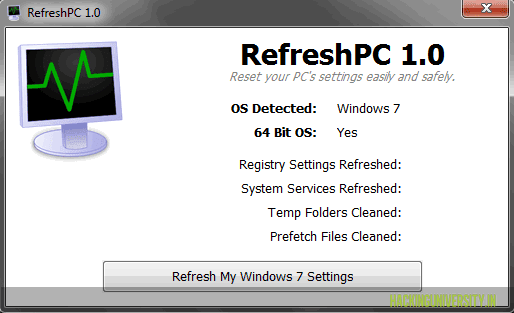
RefreshPC is a small utility that allows Free restore the default settings of Windows. This can fix many
problems on your computer. RefreshPC is easy to use and secure. When you run it you can create a restore point system, which can be useful for undoing changes made ​​by RefreshPC later if necessary.
How to Restore Windows Default Settings
After you have installed this software on your machine all you need do is click Refresh My Windows Settings. He will restore the default settings for essential services and system specific keys from the Windows registry and ultimately will make the cleaning of temporary folders.
Once the cleaning and restoration process is completed, it will prompt you to restart Windows. Click OK to restart the system and see if Windows will start to behave normally.

DOWNLOAD HERE

                    Compatible with Windows XP, Windows Vista and Windows 7 (32 and 64 biit)    

Friday, 16 September 2011

19 great Firefox extensions that everybody should have

One of my favorite thing about Firefox is the “add-on” capability, allowing you to install tiny extensions that add additional functionality that you might find useful. Mozilla has a bunch of add-ons which are always worth browsing through, but I’ll save you some time with this small list of my favorites:


Essentials:
  • AdBlock Plus – Gets rid of virtually every ad on the Internet.
    Firefox extensions are surprisingly useful.
  • Download Statusbar – Creates a bar at the bottom of the page when you’re downloading so you can easily track your download’s progress.

  • Greasemonkey – Allows JavaScript scripts to be installed. These scripts can do a huge array of things — check out userscripts.org to find some scripts for sites you like.
  • FoxyTunes – You’ll wonder how you ever lived without this one. FoxyTunes creates a small interface in the status bar that you can use to interact with your media player — you can quickly change songs, mute the volume, pause it, and so forth all from your browser window.
  • StumbleUpon – The end of your boredom on the Internet. StumbleUpon displays new and interesting sites that fit your interests.
These are cool to have:
  • DownThemAll! – Allows you to download all of the media on a page quickly and efficiently. Useful if you’re saving a ton of pictures at once.
  • Video DownloadHelper – Quickly download embedded media on sites like YouTube. Essential for downloading movies onto your iPod.
  • Image Zoom – Zoom into images or zoom out.
  • Linkification – Turns a text URL into a clickable link. Useful on some websites.
  • ReloadEvery – Automatically refreshes the page every so often. Great for checking for updates and for watching eBay bids closely at the end.
  • FoxTab – Creates a cool 3D interface for switching between open tabs.
  • Cooliris – Creates a similar 3D interface for viewing pictures.
  • Brief – Directly integrates RSS into the browser, creating a simple layout for you to catch up on your feeds.
Site-Specific:
Web Development:
  • Firebug – This list would’ve been longer, but Firebug does a lot now. From CSS to HTML to JavaScript, this extension helps web developers see changes in real-time.
  • DOM Inspector – If you’re working with JavaScript, visualizing the DOM is essential.
What extensions are you particularly fond of? Do Comment so that I can update them to in the Post.